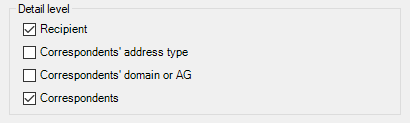
Select the detail level to display in your final report. You may end up with a summary, or a very detailed report depending on the options chosen.
| Option | Description |
|---|---|
| Recipient | Select this check box to obtain data related to the selected recipients. |
| Correspondents' address type | Select this check box to break the global traffic down by address types, such as Exchange or Internet. |
| Correspondent's domain or AG | SMTP domain or administrative group to report for. This box is only available if the 'Correspondents' address type' check box has also been selected. |
| Correspondents | Select this check box to display detail by correspondent. |
To find out what consequences on results the choice of a detail level may have, see How is traffic calculated.
Select a mailbox attribute from the drop-down list. It will be displayed for each mailbox.

Select the traffic direction to be displayed in the report: sent messages, received messages, or the total.

| Option | Description |
|---|---|
| Sent | Display sent messages. |
| Received | Display received messages. |
| Total | Display the total of sent and received messages. |

| Option | Description |
|---|---|
| Recipients with no traffic | Select this check box to include recipients for which no traffic was recorded during the reporting period. |